 Nostos
 Organize video references from Bilibili, Douyin, Kuaishou or YouTube around a purpose, such as learning a skill. Know what you have saved: a link, description, playable copy, captions and transcript are not interchangeable.
Use Save page, not an unsupported collection import
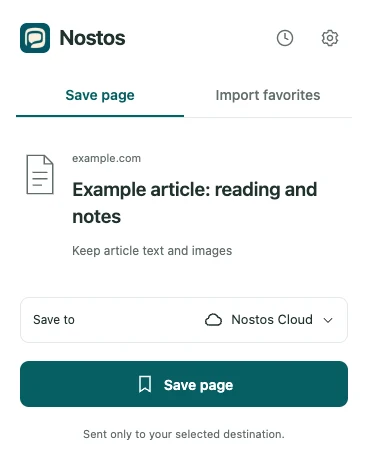
Actual extension UI with example data. Identifies controls; does not demonstrate successful source capture or upload.
Open the specific video and choose Save page. Import favorites currently targets Xiaohongshu and Zhihu collections, not bulk favorites across Bilibili, Douyin, Kuaishou or YouTube. For one learning point, retain the source link, topic and text you can actually access.
Check each source appropriately
- Bilibili: verify the video and episode. A readable description is not a caption track; check both picture and sound in any playable copy.
- Douyin and Kuaishou: short links may redirect. Verify the target item and remember that saved playback copies can have size or quality limits.
- YouTube: a title, cover or description can be only a preview. Full video and captions may be restricted and are not guaranteed.
Verify one video item
- Compare title, creator and episode to avoid a recommendation from the feed.
- Distinguish a description from a playable attachment.
- For an attachment, check beginning, middle and end with sound. A short preview is not a complete recording.
- Compare a caption or transcript sentence with something actually spoken; descriptions are not captions.
- For offline access, reopen and test playback after disconnecting. Seeing a cover beforehand proves little.
Record a useful learning point
For a photography video, you might note “aperture and depth of field, around the middle,” then replay it to record the exact time. Without a transcript, use the title and your own lead rather than asking AI to quote an audio passage that was never saved. The topic is an organizing example.
What another summary cannot fix
Login restrictions, expired media URLs, size limits and missing captions affect different stages. A new summary processes available text; it does not obtain missing media or access rights. Complete YouTube video and caption capture is not guaranteed, so use the item as a lead back to the original when needed.
Can this download an entire platform?
This is a personal saving and retrieval workflow, not an unlimited bulk downloader, full account export or access unlocker. It does not promise watermark removal or original quality. For audio, see saving podcast notes.
To compare video learning points with articles, use the video-and-reading reference workflow.