 Nostos
 Zhihu collections work well for organizing answers within Zhihu. To read accessible favorites alongside other sources, import them into Nostos. Start from the correct collection page and verify individual answer or article links afterward.
Check the page and destination
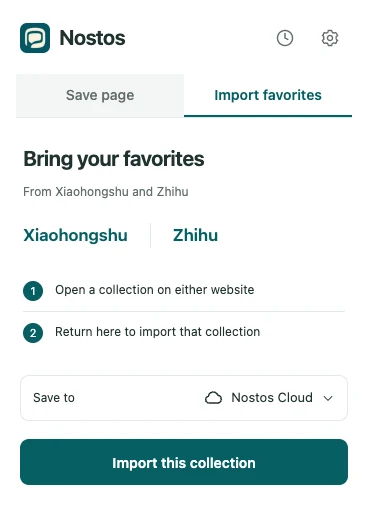
Actual extension UI with example data. Identifies controls; does not demonstrate successful source capture or upload.
Open a collection you can access in Chrome and confirm that the target answers or articles are visible. Connect a destination in the Nostos extension. Batch imports use Mac or Nostos Cloud, not the current iCloud collection path. Cloud requires Pro access; Mac requires a running client and pairing.
Confirm that you are on a collection
Zhihu batch imports recognize a specific collection page whose path looks like /collection/numbers. A question page, profile or recommendation feed is not that entry. Use the path to identify a page type, not as an instruction to invent or edit collection URLs.
Open Import favorites, check Save to, then choose Import this collection. Use Connect destination if setup is incomplete, or Choose import destination when iCloud is selected. Keep the source page open and do not navigate to a different question while it is being processed.
Verify an answer and an article
Choose one answer and one column article from the original collection as check items. Note their authors and titles. After importing, open each source link: the answer should lead to that answer and the article to that article. A shared question title is not enough to distinguish multiple authors’ answers.
If you need one argument, save that answer and the relevant excerpt. If researching a topic, retrieve several authors’ items together. Membership of the same collection does not turn different opinions into a single conclusion.
Act on the result
| Result | Meaning | Action |
|---|---|---|
| Import processed | The import task was handled, not necessarily fully uploaded | Inspect individual tasks in Save activity |
| Fewer items than the original collection | Some may be unloaded, duplicate, restricted or failed | Read the result message and compare source items |
| Right title, wrong author | A question page may have been saved instead of the answer | Open the answer permalink and choose Save page |
| A login prompt in place of text | The readable article was not obtained | Restore normal access on the source, then save again |
Before exporting a backup, inspect what the Nostos item actually contains. Export cannot create article text that was never acquired.
Importing is not a file export
An import brings accessible content into a reading library. An export produces files. This guide is not a full official Zhihu export and does not promise an Excel, Notion or PDF conversion. To back up content already in Nostos, use the app’s export controls and inspect the resulting files.
Read on your phone and find items across sources
After the extension processes the collection, follow Chrome saves on iPhone to check the destination, upload state and phone entry. If you remember an argument but not its title, use the cross-source retrieval steps, then open the original answer to verify its author and context.