 Nostos
 When saving an arXiv paper, distinguish its abstract page from the full paper. Nostos preserves the source and can obtain the corresponding official HTML body when available. An abstract-only save is not the same as reading the complete paper.
Choose abstract, HTML or PDF deliberately
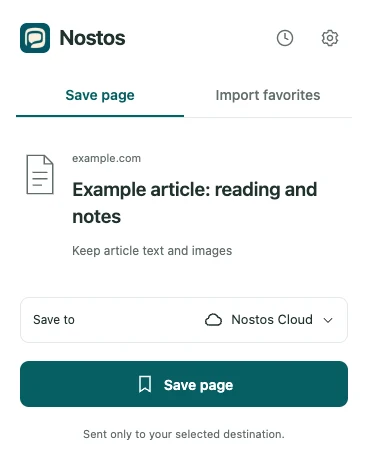
Actual extension UI with example data. Identifies controls; does not demonstrate successful source capture or upload.
| Entry | Useful for | Does not establish |
|---|---|---|
Abstract page, containing /abs/ |
Topic, authors, version and a research lead | A complete copy of methods and experiments |
Official HTML, containing /html/ |
Reading and saving body structure when available | HTML for every paper or correct rendering of every equation |
| Consulting the original page layout | That an abstract record contains the PDF body |
Do not assume changing abs to html in an arbitrary URL produces a valid page. Follow the paper’s official link for the same version. See arXiv’s HTML accessibility information.
A repeatable save check
- Choose a paper with accessible official HTML and note its identifier and version.
- Open the extension on that HTML body and choose Save page.
- Find a section heading and a paragraph beneath it in the saved item.
- Compare one figure and one equation; consult the original when something cannot be displayed.
- Follow the source link back to arXiv and verify the paper identifier.
Choose HTML or PDF on your phone
Open the official abstract page in your phone's browser. Check the paper identifier and version, then follow its HTML or PDF entry. HTML is useful for paragraph reading; keep the same-version PDF when you need original layout, page numbers or complex equations. If the official page offers no HTML, merely replacing abs with html does not establish a full-text version.
After saving to Nostos, inspect a section heading, a figure caption and the equation you actually need on the phone you will use. Two-column PDF zooming differs from HTML reading. A correct browser view is not proof of a correct saved copy, and offline use needs locally available attachments.
A real official version to check
Start with the 2402.08954v1 abstract and its same-version official HTML, titled “HTML papers on arXiv: why it’s important, and how we made it happen.” Reading that HTML on September 22, 2026 located the PDF limitations and HTML sections, Figure 1, four figure elements and one MathML element.
This paper is useful for checking version and figure identity. Its small mathematical example is not a test of complex equation rendering. For a formula you will rely on, compare the saved copy with the same-version PDF, checking fractions, subscripts and symbols. The original remains the authority.
| Problem in the saved item | Check first | Next action |
|---|---|---|
| Abstract only | Whether body section headings exist | Open the official HTML, save it and compare a passage |
| Caption without its image | Whether the image was acquired and is local | Check attachments online; use the original if missing |
| Clipped equation or table | Same-version official HTML and PDF | Verify against the original rather than inferring from an incomplete formula |
| Content differs from a citation | Identifier and v1/v2 version | Use the cited version; do not mix figure or page numbers |
What an abstract can answer
An abstract can support questions about the stated problem or claimed contribution. It cannot justify a detailed account of an experiment table or appendix proof that was never captured. Use the actual saved passage as evidence and recheck important conclusions in the original.
Does this mean arbitrary PDF parsing?
No. This guide covers arXiv abstracts and official HTML. It does not promise complete parsing of arbitrary PDFs, scans, appendices or supplementary material. Verify equations and media against the original.
For general articles, see saving across reading sources.