 Nostos
 Searching a page's body requires its text to be acquired and available to search in the current library. A URL, a Chrome bookmark or a visible cover alone does not establish that. Test the workflow with one accessible public article and a distinctive word that appears in its body rather than its title.
Define the search scope first
This guide addresses “I know the body contains this word, but I cannot find it.” It is not a web-wide search or an automatic import of every Chrome bookmark. Nostos searches content saved to the corresponding library. Favorites inside another platform need to be explicitly saved or imported through an applicable entry.
If you have forgotten the title and are unsure where you saved the article, start with the recovery workflow. Then return here to isolate a body-search problem.
Test one word from one article
- Choose an article you can normally access, without private information.
- Note one distinctive word in its body. Make sure it is not solely inside an image, and preferably absent from the title.
- Use Save page in the desktop extension, or share/paste the link into Nostos on your phone. Wait for processing.
- Open the saved item and confirm that the passage actually exists there.
- Search that word in the same library, then open a candidate and check the passage and original link.
This separates a missing-body problem from a retrieval problem. Skipping step four leaves an empty result ambiguous: the text might never have been acquired.
Body text, images, transcripts and summaries differ
| Where the remembered word came from | Check before searching |
|---|---|
| Article body | The saved item contains that passage, not a login page or abstract |
| Words in a picture | Recognized text is available; displaying an image does not prove it is searchable |
| Spoken audio or video | The corresponding text was actually acquired and processed |
| AI summary | Check the summary against the original; summary wording is not a source quotation |
Return to the source when you need the complete original. Missing paragraphs, image-recognition errors and transcript spelling can all affect whether the expected term matches.
The body exists, but the expected result does not
Try one definite word, then another concrete term. Spacing, punctuation, spelling or transcription errors can affect matches. Ordinary keyword search is not a promise of arbitrary synonym or cross-language retrieval. Dates and source clues help check candidates, but they are not necessarily supported as query syntax.
Check that you are in the same destination library and that processing or sync is not pending. If the problem persists, tell support the destination, processing state, terms tried and whether the term appears in the saved body. Passwords, access tokens and private full text are unnecessary.
A word can come from the body rather than the title
The original example article is titled Travel reading example, while prismquartz appears in its body. We imported the article and an original image into an isolated test library, quit the app, removed the test import input and reopened it. Searching for prismquartz found the article; opening it showed the corresponding body and local image.
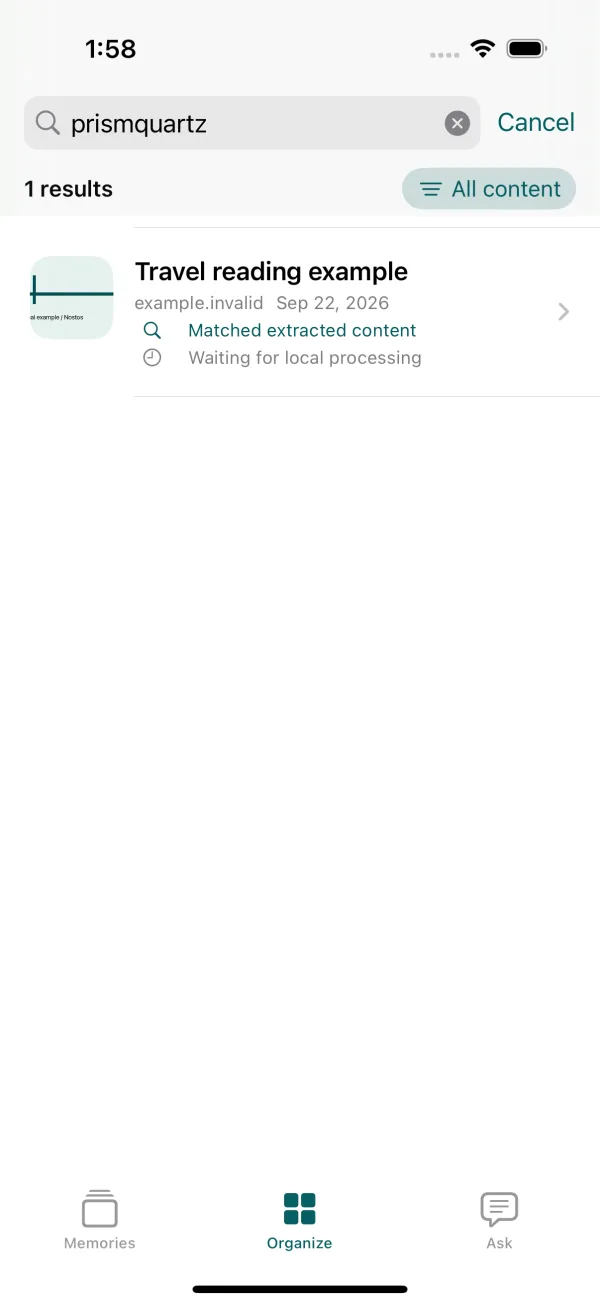
Actual Nostos development-build search on an iOS simulator. The article was prepared through a test import, not fetched from a live website.
This used the app's own saved library and search entry, not a separate demonstration search box. It establishes retrieval for this example, not complete capture of every webpage. Check the body of your own item first using the steps above.
Searching words versus asking about saved material
Use keyword search to locate an item when you remember exact text. For comparing arguments across sources, use Ask when your current features and access permit it, then inspect each citation. Locating a passage and interpreting several passages are different tasks. Neither can reconstruct a body that was not saved.
For incomplete capture, return to checking saved web articles. For WeChat images or offline availability, use the offline checks.